
Share the apps you love with friends
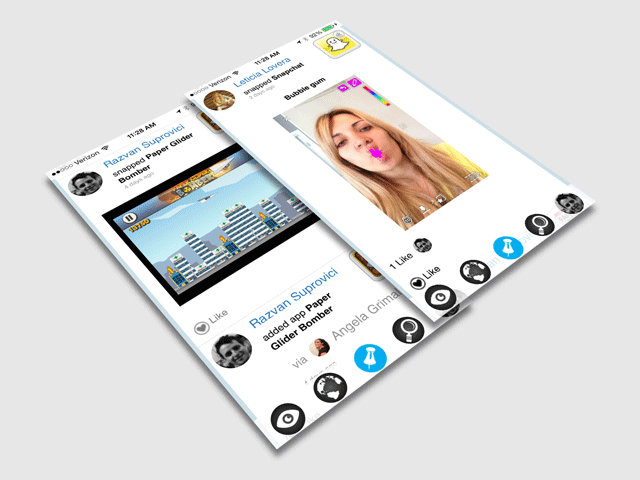
Vlibe is the social network built around app screenshots and what your friends use.
Built Around Apps
Your Apps, Told Through Screenshots
A screenshot is the moment you actually care about: the high score you finally hit, the feature that made you smile, the tiny app you stumbled on last night. On Vlibe, those moments are the posts. Nobody has to write a status update about what they were doing.
Share the apps on your profile so friends see what you use, and like or comment on screenshots from the community. It is a feed that scrolls through what people are really using, not generic posts about their day.
How Vlibe Works
Vlibe runs on a simple loop: share the apps you use, follow the people who use them, and find your next favorite app through them. Here is how it fits together.
-
1
Upload an iPhone screenshot
Pick a screenshot of an app you love, whether it is a high score, a favorite feature, or a find you want to show off.
-
2
Add the apps you use to your profile
Show the apps you use every day on your profile, and hide any private apps you would rather keep to yourself.
-
3
Follow friends and see their app activity
Follow the people you know and watch their screenshots and app picks land in one feed, so you always know what they are using.
-
4
Discover apps with friends
Open an app-specific feed or browse popular apps worldwide, then try what the people you trust already love. You can see how social app discovery works in full.
Everything You Need to Share Apps
Vlibe gives you the tools to share the apps you use, see what your friends are into, and find new favorites without leaving the feed. Here is what you get from day one.
- Screenshot sharing: post app moments, not just status updates.
- iOS uploads: add iPhone screenshots directly from your camera roll.
- Profile apps: show the apps you use on your profile.
- Friends' activity: follow people and see the apps they share.
- App-specific feeds: open a feed for any app and see who else uses it.
- Likes and comments: react to screenshots and start conversations.
- Facebook sign-in: join with your Facebook account and invite friends.
- Private apps: hide any app from your profile whenever you like.

Your friends are the best app recommendations
Get in TouchQuestions People Ask About Vlibe
Here are straight answers to the things app users ask most before they join. Vlibe is a social network built around apps, where you share screenshots, follow friends' app activity, and find new apps through people you trust.
What is the best app to share iPhone screenshots with friends?
Vlibe is built for exactly that. You upload iOS screenshots of the apps you use and share them with a community that is there to like, comment, and discover alongside you.
How do I upload iPhone screenshots to a social feed?
Pick a screenshot from your iPhone, upload it to Vlibe, and tag the app it shows. It then appears in your feed and in that app's feed for friends to see.
How can I see what apps my friends are using?
Follow your friends on Vlibe and their app activity shows up in your feed, including the screenshots they share and the apps they add to their profiles.
Is there a social network just for app screenshots?
Yes. Vlibe is a social network designed around app moments, so the screenshot feed is the center of the experience rather than an add-on to general posts.
How can I discover new apps through friends?
Watch what the people you follow share and add. You can also browse popular apps worldwide and open app-specific feeds to see how others use them. Learn more about discovering apps with friends.
Is Vlibe a good app for gamers to share screenshots?
It is. Gamers often share the moments that make a game worth trying, and Vlibe gives those screenshots a place to be seen, liked, and discussed.